


04
September
,
2026

Georgia Hull
If you manage Google Ads campaigns, you have probably seen the emails.
Google tells you that you are “one step away from maximising your results”. It encourages you to enable personalised recommendations “with one click”. You may also receive calls encouraging you to improve your optimisation score, change bidding strategies, broaden targeting or switch on automated recommendations.
One recent email we received told us:
You’re one step away from maximising your results.
It then encouraged us to enable all personalised recommendations, explaining that they would automatically apply to campaigns “without raising your budget”. Another promoted automated changes across ads and assets, bidding, keywords and targeting, and measurement.
That last part sounds reassuring.
Google won't raise your budget.
But that doesn't necessarily mean Google won't find ways to spend more of the budget you already have.
And that distinction matters.
Google Ads generates recommendations based on your campaign data, settings and Google's own models.
You can review these recommendations manually or allow certain categories to be applied automatically.
Google currently says auto-applied recommendations will not increase your campaign budget. However, the list of changes Google can automatically make is much broader than many advertisers realise.
Depending on what you enable, Google's auto-apply system can:
Google specifically describes its keyword and targeting recommendations as helping advertisers “reach out to more people”.
So while your budget ceiling may remain unchanged, the rules determining where that budget can be spent can change substantially.
Yes.
This is the part we believe advertisers need to understand.
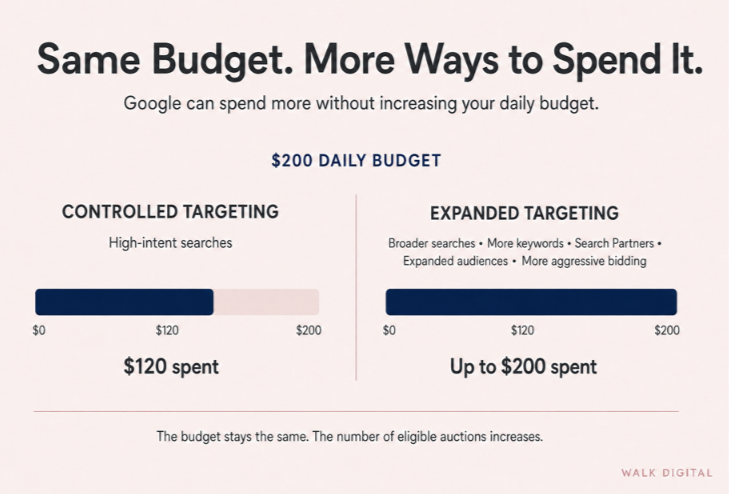
Imagine your campaign has a budget of:
$200 per day
But there is only enough high-quality, relevant search demand for Google to efficiently spend:
$120 per day
From the advertiser's perspective, that may be perfectly acceptable.
You don't necessarily want Google to spend $200 simply because $200 is available.
You want Google to spend money when the right potential customers are searching.
If there isn't enough relevant demand today, spending $120 may be better than spending $200 on progressively weaker traffic.
But Google's automated systems have other ways of finding additional opportunities.
For example:
Original targeting
High-intent searches → appropriate bids → $120 spend
could become:
Expanded targeting
High-intent searches + broader searches + additional keywords + Search Partners + expanded audiences + more aggressive bidding → $180 or $200 spend
The budget hasn't increased.
But the amount of available inventory Google can pursue has.
We have tested auto-applied recommendations in client accounts in the past.
Our experience has not been that Google simply found more of the same high-quality customer.
In a number of cases, campaign parameters became broader, spend increased and the additional traffic was not as valuable as the traffic we had deliberately been targeting.
That creates an important distinction:
Spending your advertising budget is not the objective.
Spending the right amount of your budget on the right potential customers is.
If there are only $4,000 worth of genuinely strong opportunities available in a particular month, we would generally rather spend $4,000 efficiently than force a campaign to spend an $8,000 budget by progressively widening the definition of an eligible customer.
Google actively recommends pairing broad match with Smart Bidding.
Its own documentation says broad match allows Google's algorithms to find additional auctions that can help advertisers reach growth objectives.
Google also states that when broad match recommendations are applied, additional budget may be required to target the additional relevant traffic identified by its system.
There is nothing inherently wrong with broad match.
We use automation and machine learning extensively where the data supports it.
The issue is treating broader targeting as automatically better.
For some campaigns, expanding from tightly controlled searches into a larger set of queries can produce incremental conversions at an acceptable cost.
For others, it can produce:
A campaign manager needs to determine which scenario applies.
An algorithm cannot fully make that business decision from Google Ads data alone.
This is one of the biggest limitations of automated optimisation.
Google has an extraordinary amount of auction data.
It can assess signals including:
For example, Google's Target CPA system evaluates auction-time signals and automatically changes bids to try to generate as many conversions as possible at the advertiser's target CPA.
But unless you have exceptionally good offline conversion and revenue data feeding back into Google Ads, there are things Google may not know.
It may not know that:
Google may accurately predict that changing a campaign will generate more conversions.
That does not automatically mean it will generate more profitable customers.
Those are different optimisation problems.
Of course.
Google has every reason to want advertisers to continue using Google Ads.
If advertisers consistently receive poor returns, they eventually reduce their spending or leave the platform.
So it would be wrong to claim that every Google recommendation is designed simply to waste advertiser money.
Many Google recommendations are useful.
We regularly review them.
Some fix genuine campaign problems. Some identify tracking issues. Some identify opportunities that deserve testing.
But there is also an unavoidable commercial reality.
Google sells advertising.
Alphabet reported US$294.7 billion in Google advertising revenue in 2025, including US$224.5 billion from Google Search and other properties.
Alphabet said the growth in Google Search revenue during 2025 was driven partly by growth in advertiser spending, alongside increases in search queries and improvements to advertising formats and delivery.
Google's revenue is therefore directly connected to advertising activity.
The interests of Google and an individual advertiser overlap, but they are not identical.
The advertiser's objective might be:
Generate the greatest number of profitable customers while spending no more than necessary.
The advertising platform benefits when advertisers:
Participate in more auctions, generate more paid clicks and impressions, and continue increasing advertising investment.
Those objectives can align.
But they can also diverge.
That is precisely why we don't believe the platform selling the advertising should have unrestricted authority to decide how an advertiser's money is spent.
Another common misconception is that if there are fewer searches or impressions available, campaign costs should automatically fall.
Digital advertising auctions don't necessarily work that way.
Google's own 2026 financial results provide an interesting example.
For the June 2026 quarter:
So in Google Network advertising, the number of impressions declined substantially while the amount charged per impression increased.
This does not mean the same thing happens in every Google Ads auction.
But it demonstrates an important principle:
Less inventory does not automatically mean cheaper inventory.
Advertiser competition, bidding systems, targeting and auction conditions all affect what advertisers ultimately pay.
There is another recent change advertisers should know about.
On 17 August 2026, Google changed how campaigns using Target CPA and Target ROAS behave when they are limited by budget.
Google says these campaigns will now perform more consistently towards the bidding target entered by the advertiser.
That sounds reasonable until you look at Google's own example.
Google gives the example of a campaign with:
Under the updated system, Google says that campaign can now deliver closer to an actual $10 CPA.
Google recommends lowering the target to $5 if the advertiser wants to maintain the previous level of efficiency.
Consider what that means in practice.
If your campaign was generating customers for $50 but your Target CPA was still set at $100, you should not assume Google's bidding system will continue trying to maintain the $50 result simply because it has historically achieved it.
You have told Google that $100 is acceptable.
The system now has greater scope to optimise towards what you said you were prepared to pay.
This makes blindly allowing automated recommendations to adjust CPA and ROAS targets something we would be particularly cautious about.
This is another area where advertisers can feel unnecessary pressure.
Google Ads may show recommendations accompanied by messages suggesting that applying them will improve your optimisation score.
That can make a 70%, 80% or 90% optimisation score feel as though something is wrong with the account.
But there is something many advertisers don't realise.
You don't have to apply a recommendation to improve your optimisation score.
Google states that an account can reach a 100% optimisation score by either applying or dismissing all recommendations.
So if Google recommends broad match and you determine broad match is inappropriate for that campaign:
Dismiss the recommendation.
If Google recommends changing your Target CPA and the economics of your business say otherwise:
Dismiss it.
If Google recommends expanding onto Search Partners and your historical data shows poor-quality leads:
Dismiss it.
Your optimisation score is not a substitute for business performance.
No.
That would be equally poor campaign management.
The better approach is to treat Google's Recommendations tab as exactly that:
Recommendations.
Not instructions.
Every recommendation should be assessed against the actual objective of the business.
Ask:
Those are very different questions from:
Will this increase my optimisation score?
We would generally keep human approval over recommendations that materially change:
Including:
Including:
Including:
Even where Google says the recommendation itself will not raise the campaign budget, we want to understand whether the proposed change could allow the campaign to consume more of the existing budget by accessing additional auctions or accepting less efficient conversions.
There are other recommendations, particularly around genuine technical issues, measurement and account maintenance, that may be much lower risk.
The point is not that automation is bad.
The point is that automation should have boundaries.
For most accounts we manage, our answer is:
Not across the board.
We would rather have Google make recommendations and have an experienced campaign manager decide whether they make commercial sense.
Google Ads is exceptionally good at finding ways to distribute advertising.
But your business objective isn't necessarily to distribute as much advertising as your budget permits.
Sometimes the correct outcome is:
There was less relevant demand this month, so we spent less.
That can be a sign of responsible campaign management, not campaign failure.
If high-quality demand returns next month, spend can increase with it.
What we don't want is an automated system progressively broadening targeting, entering additional auctions or changing bidding parameters simply to find somewhere else to spend the unused budget.
Google's own documentation makes clear that auto-applied recommendations can change bidding, targets, keywords, match types and reach without technically increasing your campaign budget.
And that is the distinction advertisers need to understand.
Google doesn't have to increase your budget to increase how much of it gets spent.
It only needs to increase the number of situations in which your ads are eligible to compete for it.
For some campaigns, that expansion produces profitable growth.
For others, it produces more spend, more conversions on a dashboard and fewer genuinely valuable customers.
The job of good Google Ads management is knowing the difference.
Generally, no. Google’s recommendations should be reviewed individually to determine whether they support your business goals, lead quality and profitability.
Yes. Google can broaden keywords, targeting, audiences and bidding settings, allowing your campaign to enter more auctions and spend more of its existing budget.
No. Some recommendations can resolve technical or measurement issues, while others may increase reach and spend without improving customer quality or profitability.
Not necessarily. The optimisation score reflects how closely your account follows Google’s recommendations, not whether your campaigns generate profitable customers.
Yes. Google states that you can reach a 100% optimisation score by either applying or dismissing all recommendations.
Broad match can help identify additional searches, but it can also attract lower-intent or irrelevant traffic. It should be tested and monitored against lead quality and sales results.
Google may optimise towards form submissions, calls or other recorded conversions without knowing which leads become paying customers. Accurate CRM and offline conversion data can help address this gap.
Recommendations that change bidding strategies, CPA or ROAS targets, keywords, match types, Search Partners, Dynamic Search Ads or targeting expansion should generally require human review.
No. Spending less can be appropriate when there is limited high-quality search demand. Using the full budget is not beneficial if the additional spend attracts weaker traffic or unprofitable leads.
Consider whether the change will improve qualified leads, customer value and profitability. Review search terms, previous campaign results, sales data and whether Google is optimising towards a meaningful conversion.

.svg)


Georgia is a marketer with over 15 years specialising in automation, driving revenue and brand awareness. Achieving growth by implementing strategies designed to drive customers to action from first contact along a journey through repeat purchase then on to passionate advocacy. She has experience working in challenging industries delivering consistent increased revenue and profits, with a focus on exceeding targets.
Specialties: Digital Advertising, marketing automation, segmentation and personalisation, content strategy, customer nurture, customer journey mapping, digital strategy, conversion tracking, database acquisition, CRM, process management, analytics.