


19
August
,
2026

Chris Walker
Google has changed how some automated bidding strategies work when a Google Ads campaign is limited by budget.
From 17 August 2026, campaigns using target-based bidding will optimise more consistently towards the CPA, ROAS or, in some Demand Gen campaigns, CPC target that the advertiser has entered.
For some businesses, particularly those whose campaigns have historically performed better than their nominated target, this could result in noticeable changes to cost per acquisition, return on ad spend, conversion volume and where advertising spend is allocated.
The change does not mean that every Google Ads campaign needs to be adjusted. However, businesses using automated bidding should review their campaigns and make sure the targets entered into Google Ads reflect the results they actually want to achieve.
The change relates specifically to campaigns that are:
Until now, some budget-constrained campaigns have significantly outperformed the CPA or ROAS target entered into Google Ads.
For example, a business may have a Target CPA of $100 but the campaign has recently been generating conversions for an average CPA of $60.
From 17 August, Google says these campaigns will optimise more consistently towards the $100 target the advertiser has actually entered, rather than continuing to substantially outperform it.
That means the target sitting inside your campaign becomes more significant.
If that $100 Target CPA is simply an old setting and the business actually needs leads at around $60, leaving the target unchanged could allow Google greater flexibility to acquire conversions closer to $100.
Google's stated reason for the change is to provide more predictable performance when advertisers increase or decrease campaign budgets.
The change primarily applies to budget-limited campaigns using:
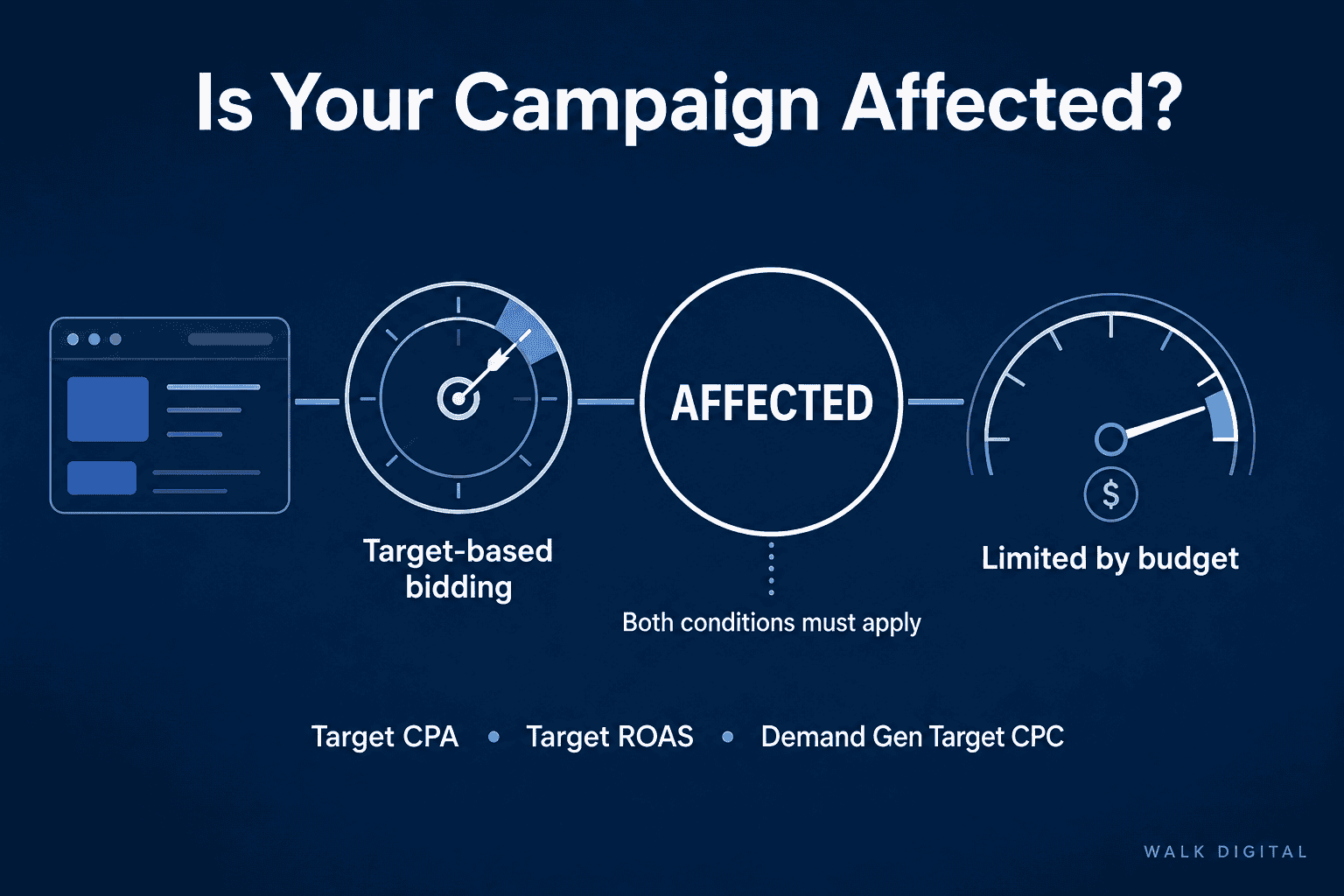
Google says the change applies across Search, Shopping, Performance Max and Demand campaigns.
Display campaigns already use the updated bidding behaviour, so they are not moving onto the new behaviour for the first time on 17 August.
The update can also affect portfolio bidding strategies and campaigns using shared budgets. Where a constrained shared budget is being used, Google says the effect can be distributed across campaigns within that group.
The update does not change the behaviour of Target CPA or Target ROAS campaigns that are not constrained by budget.
Google says unconstrained campaigns already optimise towards their stated target and will continue doing so.
The update also does not apply in the same way to:
Google has confirmed that App, Video Reach and Video View campaigns will continue using their previous bidding behaviour.
The biggest risk is where there is a substantial difference between your stated target and your actual recent performance.
Consider a campaign with:
Target CPA: $100
Actual recent CPA: $60
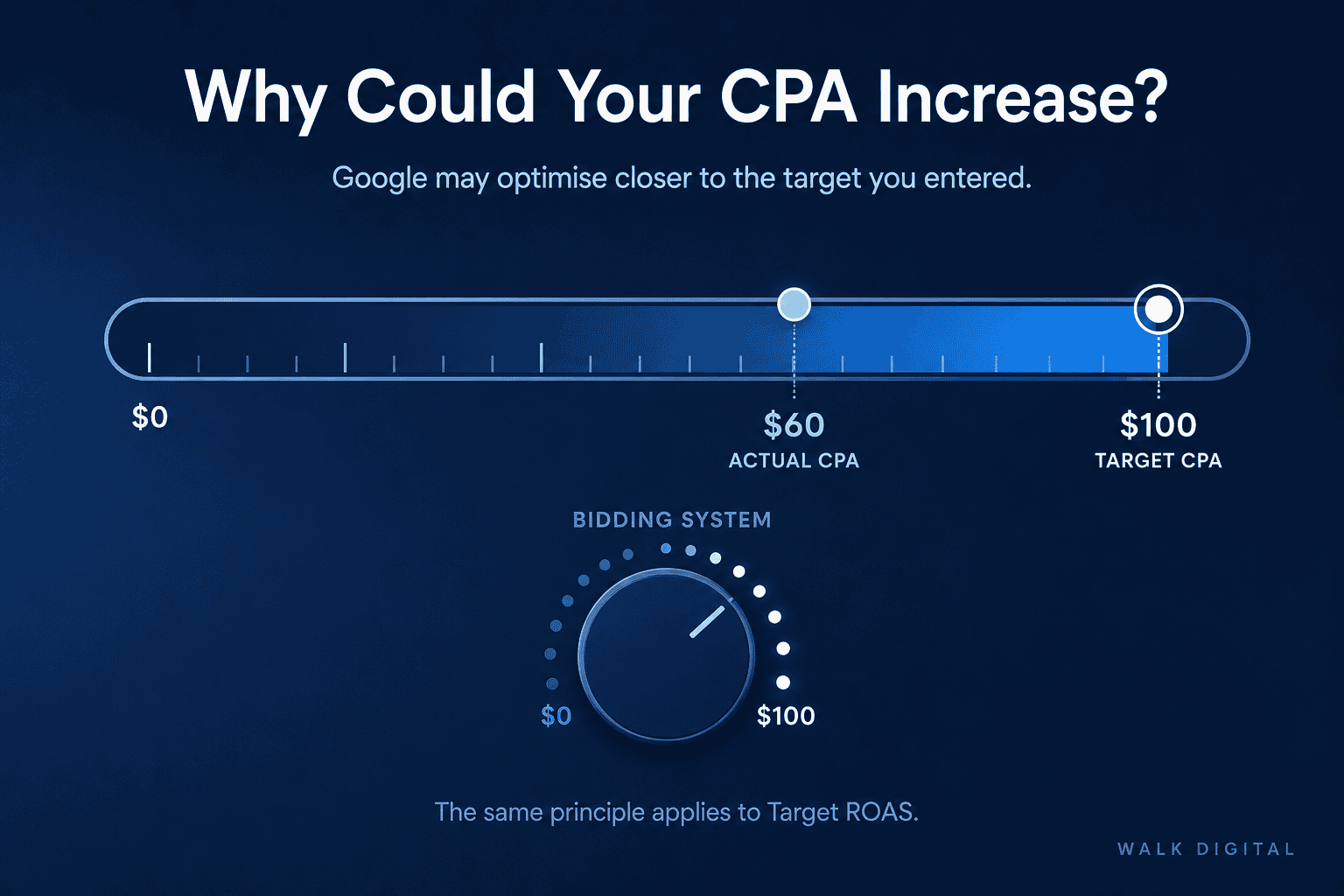
Previously, the campaign may have continued producing leads around $60 despite having permission to spend up to approximately $100 per acquisition.
Under the updated system, Google will attempt to optimise more consistently towards the target you have provided.
That does not necessarily mean the CPA will immediately become exactly $100. However, Google specifically warns that campaigns which have historically overachieved their targets may experience performance volatility if targets are not reviewed.
The same principle applies to Target ROAS.
If your Target ROAS is considerably lower than the return your campaign has recently been achieving, the campaign now has greater scope to optimise closer to that lower target while attempting to generate additional conversion volume.
Yes.
Performance Max is one of the campaign types covered by the update when it is budget-constrained and using an affected target-based bidding strategy.
Because Performance Max operates across several Google channels, Google also warns that advertisers may see changes in how spend and traffic are distributed between channels after the bidding update. Demand Gen campaigns may experience similar allocation changes.
For businesses running Performance Max, this means it is worth looking beyond the overall campaign result and monitoring whether traffic, conversion volume and conversion value change following the update.
No.
Google has confirmed that it will not automatically change your bidding targets or daily budgets as part of this update.
The responsibility therefore remains with the advertiser to determine whether the current target accurately represents the business's objective.
This is one of the most significant parts of the update.
A target that was previously treated almost like a loose upper or lower boundary may now have a more direct influence on actual performance in campaigns constrained by budget.
Businesses should start by identifying campaigns that are both Limited by budget and using Target CPA, Target ROAS or the applicable Demand Gen Target CPC strategy.
In Google Ads, review the campaign status column for campaigns showing Limited by budget.
Google defines this status as a campaign where the average daily budget is not sufficient to capture all of the available traffic under its current settings.
These are the campaigns most relevant to the August bidding update.
For each affected campaign, compare the bidding target with recent results.
For Target CPA campaigns, compare:
Target CPA vs actual CPA
For Target ROAS campaigns, compare:
Target ROAS vs actual ROAS
Pay particular attention where performance has been substantially better than the target.
If your Target CPA is $100 but your campaign has consistently produced leads for $60, ask whether you would genuinely be comfortable paying closer to $100.
If the answer is no, the target should be reviewed.
Don't change CPA or ROAS targets simply because Google recommends a particular number.
Work backwards from what a customer or lead is worth to the business.
For lead generation, that can include:
For ecommerce, consider:
Your Google Ads target should reflect the economics of the business rather than being an arbitrary figure left in the account from an earlier campaign strategy.
Google has introduced a Bid Target Adjustment Tool specifically to help advertisers review affected campaigns.
It can be accessed through the Google Ads notification labelled Review your campaign targets or through the bidding settings of eligible campaigns.
Google may recommend a target based on recent campaign performance.
That recommendation can be useful as a reference point, but businesses should still assess whether the proposed CPA or ROAS makes commercial sense before applying it.
Google also notes that campaigns with fewer than seven conversions may not receive a recommended target because there is not enough data to generate a reliable recommendation.
If an affected campaign begins moving after the bidding update, avoid reacting to every daily fluctuation.
Google recommends evaluating performance over approximately one to two conversion cycles after target adjustments before assessing the result.
Businesses with longer sales or conversion delays may therefore need to wait longer before determining the true effect.
Google also advises against applying data exclusions or new bid limits solely because of this update, as additional changes can introduce further performance fluctuations.
Google has also advised that its budget and bidding forecasting tools may experience some inaccuracies while the new bidding behaviour is being introduced.
Google specifically recommends caution when using forecasts between 17 August and 31 August 2026.
Businesses making major budget decisions during this period should therefore compare forecasts against actual campaign data and commercial targets rather than relying on forecast figures alone.
Not necessarily.
The update does not automatically mean businesses should increase their advertising spend.
If your current CPA or ROAS target accurately reflects the return the business needs, Google says providing additional budget headroom can allow campaigns to capture more volume while maintaining that target.
But increasing the budget does not solve an incorrectly configured target.
Before spending more, determine:
Budget decisions should come after those questions are answered.
Not automatically.
Target CPA and Target ROAS remain useful Smart Bidding strategies where a business has sufficient conversion data and a clear acquisition or return target.
Google also provides the option of using Maximise Conversions or Maximise Conversion Value without a target where the primary objective is to generate the greatest possible volume or value from a fixed budget.
The right option depends on whether the business prioritises:
The August update makes this distinction more relevant because Google intends target-based strategies to adhere more consistently to the target advertisers specify.
For affected campaigns, monitor performance over the weeks following 17 August rather than looking only at spend.
Pay particular attention to:
If CPA increases or ROAS declines towards the target currently entered in the account, that may be a result of the new bidding behaviour rather than an unexplained deterioration in campaign performance.
The next question should then be whether the target itself is right for the business.
Google is giving advertisers greater consistency between the target they enter and the performance its automated bidding system attempts to achieve.
That can make scaling more predictable, but it also means businesses need to be more deliberate about the targets they give Google.
For advertisers that have left loose CPA or ROAS targets in place while campaigns consistently performed well above those requirements, there could be a significant drop in performance
The priority is therefore not to make broad changes across every Google Ads campaign.
Instead:
Google's automated bidding is only as commercially useful as the objectives and conversion data being supplied to it.
With the 17 August 2026 update now taking effect, reviewing those settings should be a priority for businesses using Google Ads.
Google changed how budget-constrained campaigns using target-based automated bidding optimise. These campaigns will now perform more consistently towards the CPA, ROAS or applicable Demand Gen CPC target entered by the advertiser.
The change applies to affected Target CPA and Target ROAS campaigns across Search, Shopping, Performance Max, Demand Gen and Travel, plus Target CPC for Demand Gen. The main condition is that the campaign is constrained by budget.
No. Target-based campaigns that are not limited by budget will continue operating as before. App, Video Reach and Video View campaigns also continue using their previous bidding behaviour.
Yes. If a budget-limited campaign has historically achieved a CPA considerably lower than its Target CPA, Google says performance may move closer towards the target entered into the campaign.
Potentially. The same principle applies to Target ROAS. If actual ROAS has been substantially exceeding the target, the campaign may optimise more consistently towards the stated target after the update.
No. Google has stated that it will not automatically adjust advertisers' bid targets or daily campaign budgets as part of the change.
Review the campaign's current bidding strategy, compare its target CPA or ROAS against recent actual results and determine whether the existing target still reflects your business objectives. Google also provides a Bid Target Adjustment Tool for eligible campaigns.
Google recommends waiting approximately one to two conversion cycles before assessing performance after adjusting targets or after the new bidding behaviour takes effect.
Your Google Ads CPA may increase if a budget-limited campaign was previously achieving a lower CPA than its Target CPA. Since 17 August 2026, Google has been optimising affected campaigns more consistently towards the target entered, which may allow the actual CPA to move closer to that figure.
Look for the Review your campaign targets notification in your Google Ads account. You can also open an eligible campaign, select Settings, then Bidding, and click Review campaigns.
The tool may not appear if your account does not contain an eligible campaign. Notifications are generally triggered for advertisers with campaigns that used an affected target-based strategy and were limited by budget during the previous 12 months.
Google may not provide a recommended target when a campaign has fewer than seven conversions. In this situation, review a longer period of campaign data and set the target according to your acceptable CPA, required ROAS and wider business economics.
Consider lowering it if your campaign has consistently achieved a lower actual CPA and you need to maintain that acquisition cost. Base the decision on recent performance, lead quality, sales conversion rates and the amount your business can afford to pay for a customer.
Consider increasing it if the campaign has consistently achieved a higher actual ROAS and the current target is below the return your business requires. Review gross margin, average order value and customer lifetime value before changing the target.
A target adjustment can cause Google’s bidding system to adapt and may produce temporary fluctuations. Google recommends allowing approximately one to two conversion cycles before assessing the result.

.svg)


Chris Walker has helped companies find the right digital solutions to achieve their business goals for more than 15 years and has worked with almost all the key digital platforms across the whole space.
He is a Meta and Google Ads Expert, as well as a certified ActiveCampaign Consultant and klaviyo partner. He has a broad range of experience including digital strategy, content creation, strategic partnerships, marketing automation and digital advertising. He has helped businesses redesign their customer journey and content, resulting in increased sales and conversion and drive more traffic.