


31
July
,
2026

Georgia Hull
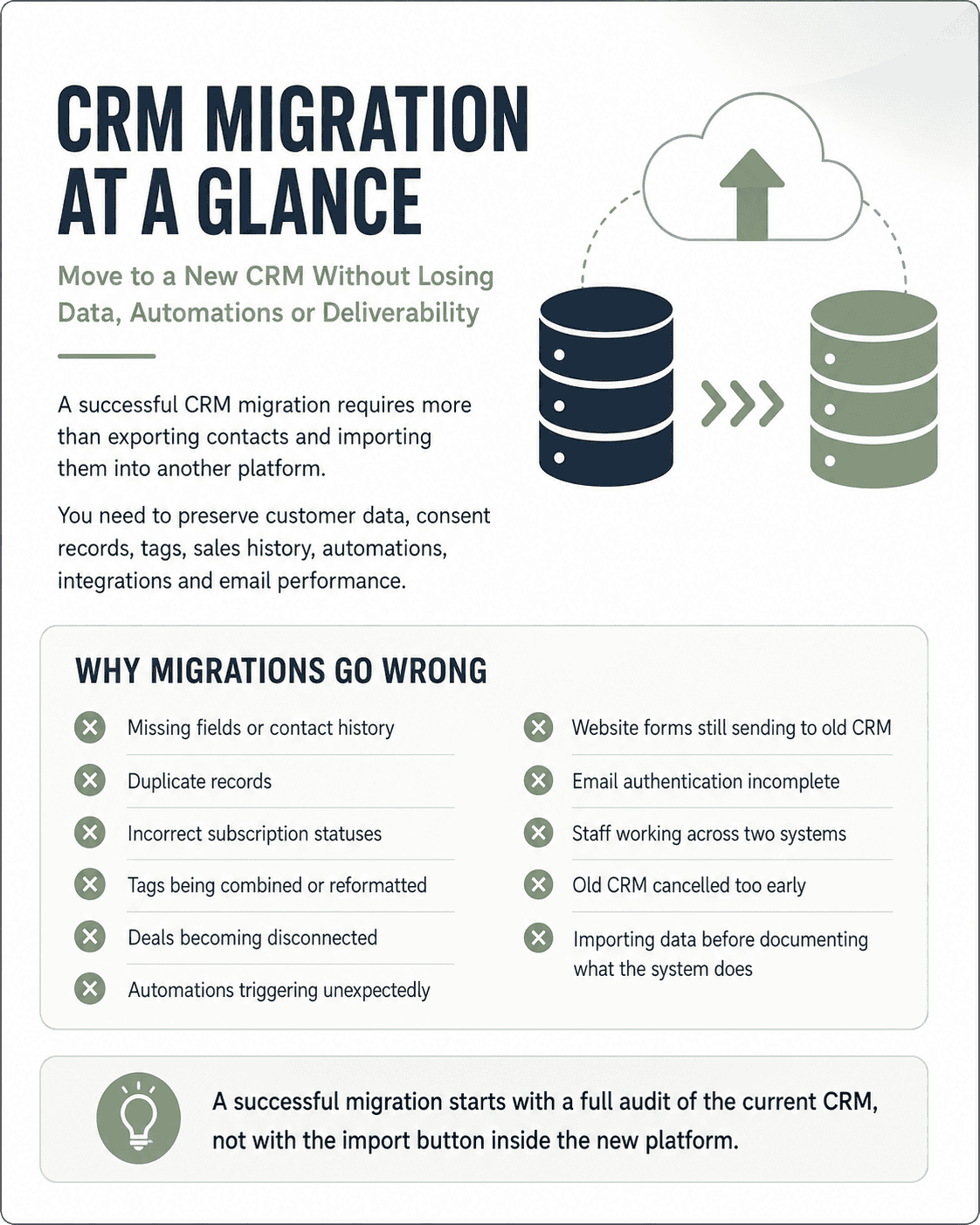
A successful CRM migration requires more than exporting contacts from one platform and importing them into another.
You need to preserve customer data, consent records, tags, sales history, automations, integrations and email performance. You also need to confirm that the new platform can support your business before your old CRM is switched off.
The safest approach is to treat the migration as a structured technical project with four main stages:
This CRM migration guide explains how to complete each stage while reducing the risk of lost data, broken workflows and interrupted customer communications.
A CRM migration is the process of moving customer records, sales data, email marketing information, automations and connected systems from one CRM platform to another.
Depending on your current setup, this may include:
Some information can be transferred through CSV files. Other information may require an API, integration, custom import or manual rebuild.
For example, ActiveCampaign advises that contact notes are not included in its standard contact exports. HubSpot also treats contact properties, activities, associations and property histories as separate types of export data. This is why a standard contact export should never be assumed to contain your complete CRM history.
CRM migrations usually fail because the business begins importing data before it has documented what the current system does.
Common problems include:
A successful migration starts with a full audit of the current CRM, not with the import button inside the new platform.
Create a complete inventory of the records, tools and processes that depend on your CRM.
Include:
This audit becomes the migration scope. Without it, features may only be identified after the new CRM has gone live.
Do not assume every feature in the old CRM needs to be replicated.
Review each feature and classify it as:
This step can identify unnecessary subscriptions, unused functionality and inefficient automations.
It also prevents the business from paying for a more expensive platform simply because it appears to have more features. The better platform is the one that supports the functions, contact volume, integrations and reporting your business actually needs.
A long data freeze is not practical for every business. Sales teams may still need to update deals, new enquiries may continue arriving and customers may keep submitting forms.
Instead, establish:
For smaller databases, the team may stop making changes during the final export. Larger businesses may need a staged migration or a final incremental import containing only records changed since the first export.
Do not rely on one contact CSV.
Export and securely store:
Keep the original, unedited exports as your source backup. Perform cleaning and formatting in separate working copies.
Individual email events do not always transfer through a standard contact export. Even where a platform allows deeper activity exports, the new CRM may not be able to recreate that event history in the same format.
Before exporting, convert useful engagement information into fields or tags that can be migrated.
For example:
Use meaningful customer actions when building these segments, including:
Email opens should not be the only engagement measure. Apple Mail Privacy Protection can prevent senders from determining whether an Apple Mail user opened a message, while some platforms may record privately preloaded content as an open. This can inflate open-based engagement segments. Clicks, purchases and other direct actions generally provide stronger migration and warm-up signals.
Tags can lose their meaning when they are moved without documentation.
Create a data dictionary containing:
Export at least 6 to 12 months of relevant performance data before closing the old account.
Depending on your CRM, record:
These benchmarks help you identify whether a post-migration decline is caused by deliverability, missing data, broken tracking or a change in audience behaviour.
Migrating poor-quality data transfers the same problems into the new platform.
Before importing:
Do not delete suppression or unsubscribe information. These records must be preserved so that previously unsubscribed people are not accidentally added back to an active marketing list.
The new CRM must know who cannot receive marketing before active contacts are imported.
Create separate files for:
Import or configure these as suppressions before activating campaigns or automations.
Mailchimp, HubSpot and other CRM platforms provide specific processes for importing opt-out or suppression lists rather than treating these contacts as active subscribers.
For Australian businesses, commercial electronic messages generally require consent, accurate sender identification and a functional unsubscribe option. Unsubscribe requests must be honoured within five working days. Migrating a contact does not create new consent to market to that person.
Map every source field to its destination before importing data.
Your mapping document should show:
Check whether the new platform:
Automations rarely transfer as working workflows.
For every automation, document:
Rebuild and test automations in an inactive or draft state. Do not allow imported historical records to enter live workflows unless that behaviour is intentional.
Pay particular attention to:
Before sending marketing email from the new platform, configure the authentication records supplied by that platform.
This will normally include:
Do not overwrite an existing SPF record without checking all current sending services. Follow the exact DNS instructions supplied by the new platform and test that authentication passes before launch.
Google requires all senders to use SPF or DKIM and requires higher-volume senders to use SPF, DKIM and DMARC. Google and Yahoo also require bulk senders to keep reported spam rates below 0.3% and support straightforward unsubscribing.
Import a representative sample before moving the entire database.
A pilot should include records with:
A sample of 50 to 100 records may be suitable for a straightforward migration, but the correct test size depends on the number of record types and variations in your database.
For every test record, compare the old and new CRM.
Check:
Document every issue and update the mapping rules before proceeding.
Submit live test records through every connected entry point.
This may include:
Confirm that each test:
After the pilot passes, complete the full import and compare totals across both systems.
Reconcile:
Investigate differences rather than assuming they are caused by duplicate removal.
Where commercially practical, retain read-only access to the old CRM during the initial post-launch period.
This gives your team a reference point for:
Do not cancel the old platform until the new CRM has passed data reconciliation, integration testing, automation testing and user acceptance testing.
Sender reputation does not simply disappear, but it also should not be assumed to transfer without disruption.
Your reputation can be associated with several elements, including:
A strong existing domain reputation may help when the new sending infrastructure is authenticated correctly. However, a new dedicated IP, new subdomain, changed sending pattern or sudden volume increase may still require a controlled ramp-up. Microsoft notes that authenticated new IPs may inherit some domain reputation, but the speed of the ramp depends on volume, list accuracy and complaint levels.
Not every migration requires the same warm-up process.
A more controlled warm-up is generally needed when:
The new CRM provider should confirm whether you are using shared or dedicated sending infrastructure and provide a plan suited to that setup.
Begin with recipients who are most likely to recognise and engage with your emails.
Prioritise contacts with recent:
Then expand sending gradually to broader engaged segments.
An illustrative sequence could be:
Increase volume only when the previous sends show stable delivery, low complaints, acceptable bounces and normal engagement.
A warm-up may take several sends or several weeks. Microsoft advises that marketing sender warm-up can take four to eight weeks depending on volume and recipient engagement, while established domains using new authenticated IPs may ramp more quickly.
Monitor:
Google advises keeping user-reported spam below 0.3%. This is a maximum threshold, not a performance target, so complaint rates should remain well below it.
Do not decide whether to increase sending volume using open rates alone. Privacy protection and automated security tools can distort both open and click reporting. Compare several indicators, including complaints, bounces, clicks, conversions and mailbox-provider errors.

☐ Before switching off your old CRM, confirm that you have:
☐ Audited all data, workflows and integrations
☐ Confirmed the new platform requirements
☐ Exported original backups
☐ Preserved consent and suppression records
☐ Cleaned duplicates and invalid data
☐ Created a field-mapping document
☐ Documented tags and automation logic
☐ Configured SPF, DKIM and DMARC
☐ Imported suppressions before active contacts
☐ Completed a pilot import
☐ Reconciled record totals
☐ Rebuilt and tested automations
☐ Tested forms and third-party integrations
☐ Confirmed reporting and attribution
☐ Trained CRM users
☐ Established a sending ramp-up where required
☐ Retained temporary access to the old platform
☐ Documented ownership of future CRM maintenance
The timeframe depends on the number of contacts, data types, automations, pipelines and integrations involved.
A straightforward contact migration may take several weeks. A CRM containing multiple sales pipelines, ecommerce data, historical activities, custom integrations and marketing automation will usually require a longer staged implementation.
The migration should be scoped after the current CRM has been audited.
Not always.
Contact details and basic custom fields are usually easier to transfer. Email event history, notes, tasks, attribution data, automation history and record relationships may require separate exports, APIs or manual archiving.
Confirm the export and import limitations of both platforms before selecting the new CRM.
Usually not.
The contacts and fields used by an automation may be migrated, but the workflow logic generally needs to be rebuilt and tested in the new platform.
Automations should be documented before the old account is closed.
It can.
Your sending domain may retain some reputation, but changes to sending infrastructure, authentication, IP address, subdomain, audience or volume can affect delivery.
Complete authentication before sending and use a controlled ramp-up where the new platform or sending conditions require it.
Yes, but they should be migrated as suppressed or unsubscribed records, not as active marketing contacts.
Keeping these records helps prevent someone who previously opted out from being accidentally resubscribed during a future import.
Clean it before migration.
This reduces the number of records being transferred and prevents duplicates, invalid addresses and obsolete fields from being recreated in the new system.
Run another quality check after the import to identify any issues caused by mapping or matching rules.
Yes.
A staged migration can allow normal operations to continue. This requires a controlled cutover, a record of changes made after the first export and a final import or synchronisation before the new CRM becomes the primary system.
Marketing sends and automation changes may still need to be paused during the final cutover.
Start with the business requirements, not the platform feature list.
Compare:
The best option is the platform that supports the required processes at an appropriate total cost, without forcing the business to pay for unused functionality.
Yes.
A migration can reduce costs when the existing CRM includes unnecessary features, unsuitable contact pricing or functionality that can be provided more efficiently by another platform.
Cost should still be assessed alongside implementation requirements, integrations, deliverability, user training and future scalability.
Walk Digital helps businesses assess, plan and complete CRM and email marketing platform migrations.
We can support your migration through:
In one recent client migration, Walk Digital reduced the client’s ongoing CRM cost by more than 50% while maintaining the features and functionality the business required. The new plan also retained the same contact-record allowance, so the savings did not require the client to reduce its database or remove necessary capabilities.
The result came from reviewing what the business actually used, comparing suitable platforms and planning the migration around its data, integrations and marketing requirements.
Before committing to a new platform, it helps to understand:
Talk to Walk Digital about your current CRM, contact volume, platform costs, automations and integrations. We can help you assess your options and develop a practical migration plan before you make the move.

.svg)


Georgia is a marketer with over 15 years specialising in automation, driving revenue and brand awareness. Achieving growth by implementing strategies designed to drive customers to action from first contact along a journey through repeat purchase then on to passionate advocacy. She has experience working in challenging industries delivering consistent increased revenue and profits, with a focus on exceeding targets.
Specialties: Digital Advertising, marketing automation, segmentation and personalisation, content strategy, customer nurture, customer journey mapping, digital strategy, conversion tracking, database acquisition, CRM, process management, analytics.