


17
April
,
2026

Chris Walker
.jpg)
Many businesses build automations in ActiveCampaign with the intention of creating a seamless customer journey. However, a common issue is overcomplication. When automations become too complex, they are harder to manage, update, and troubleshoot when something goes wrong.
This often leads to frustration, wasted time, and systems that no one fully understands.
Breaking your customer journey into smaller, more manageable automations. You’ll learn how to structure your automations so they are easier to maintain, quicker to update, and far more efficient to troubleshoot when issues arise.
Automation simplification is the process of breaking down large, complex automations into smaller, more manageable pieces. Instead of building one long, complicated workflow, you create multiple simpler automations that work together.
This approach makes it easier to manage, update, and troubleshoot your customer journey over time, especially as your business grows or changes.
When automations are simple and broken into smaller parts, it becomes much easier to understand how each part of the journey works.
Making changes to a large, complex automation can be time-consuming and risky. Smaller automations allow you to make updates quickly without affecting the entire system.
If something breaks, complex automations make it difficult to identify the issue. Simpler automations allow you to isolate and fix problems faster.
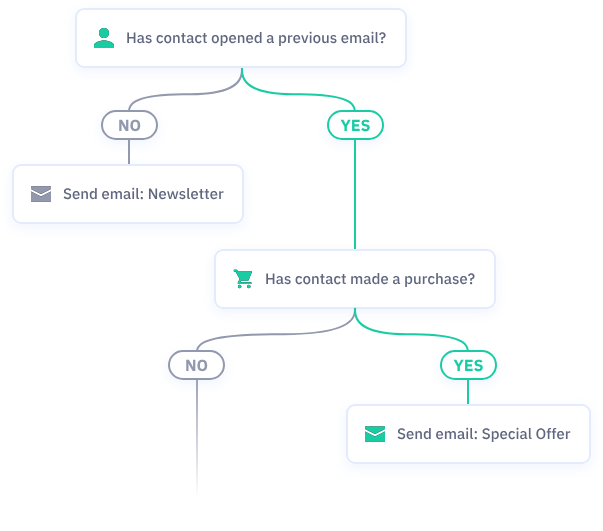
When multiple automations are clearly structured and documented, new team members can quickly understand how everything works.
Using tools like the automation map in ActiveCampaign helps you see how different automations connect and interact across the customer journey.
A business creates one long automation covering the entire customer journey. Over time, it becomes difficult to update and nearly impossible to troubleshoot when issues occur.
Avoid building overly complex workflows. Focus on clear, specific outcomes for each automation.
Split your customer journey into smaller automations that are easier to manage and update.
Keep a record of each automation and what it does. This ensures you can easily make changes later or onboard new team members.
If you already have automations set up, use ActiveCampaign’s automation map tool to understand how everything connects.
Overcomplicated automations create more problems than they solve. By simplifying your setup and breaking your customer journey into smaller, well-documented automations, you create a system that is easier to manage, update, and troubleshoot. This approach not only saves time but also ensures your automation continues to work effectively as your business evolves.
If your automations feel too complex or difficult to manage, it may be time to simplify your setup. Reach out to review your current customer journey and identify opportunities to streamline your automations.

.svg)


Chris Walker has helped companies find the right digital solutions to achieve their business goals for more than 15 years and has worked with almost all the key digital platforms across the whole space.
He is a Meta and Google Ads Expert, as well as a certified ActiveCampaign Consultant and klaviyo partner. He has a broad range of experience including digital strategy, content creation, strategic partnerships, marketing automation and digital advertising. He has helped businesses redesign their customer journey and content, resulting in increased sales and conversion and drive more traffic.